Custom Watermark
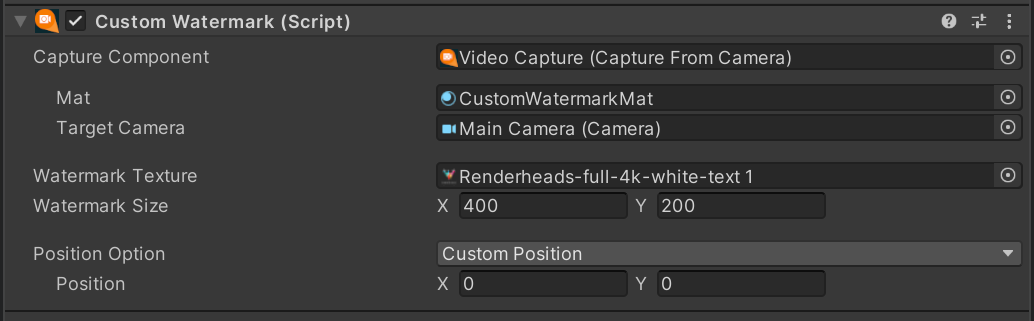
The Custom watermark component will allow users to apply a watermark to their captures, no matter which capture component they are using. It also allows for several positing options, giving you full control.
Capture Types
As there are multiple different Capture Components available within AVPro Movie Capture the CustomWatermark component will adapt the component that you are currently using.
When no capture component is selected, the component will show a warning, stating "No Capture Component Selected, Please Select a Capture Component for Custom Watermark to be injected". As stated, to get full use of the component, you must select the capture component that you are using.

Capture From Camera

Applies the watermark directly to the camera, by injecting a post action callback where the watermark is renderered.
Property Function Mat The material to use when rendering the watermark during the camera's post action callback. Target Camera The camera to which the watermark will be rendered to. Capture From Camera 360

Applies the watermark directly to the camera, by injecting a post action callback where the watermark is rendered. This component also allows you to specify the face to draw the watermark to.
Property Function Mat The material to use when rendering the watermark during the camera's post action callback. Target Camera The camera to which the watermark will be rendered to. Render To Face The face on the cubemap to render to. Capture From Camera 360 ODS

Applies the watermark onto the texture after it has finished the ODS render. A custom material cannot be set for this option, as it requires a custom shader to map the Watermark from regular space to the Equi-Rect layout of the texture produced from the ODS render.
Property Function Render To Face The face to render to. Warning
When using Capture From Camera 360 ODS you must tick the "Support Watermark" tickbox within the component itself, to allow the use of the alternative watermark shader.

Capture From Screen

Applies the watermark directly to the camera, by injecting a post action callback where the watermark is renderered. This component also allows you to specify the face to draw the watermark too.
Property Function Mat The material to use when rendering the watermark during the camera's post action callback. Target Camera The camera to which the watermark will be rendered to. Capture From Texture

Blits the watermark directly onto the texture that was captured.
Property Function Texture Blit Material The material to use when blitting the watermark to the final texture. Capture From Web Cam Texture

Blits the watermark directly onto the texture that was captured.
Property Function Texture Blit Material The material to use when blitting the watermark to the final texture.
Positioning Types
The Positioning types determine where the watermark is drawn, and, if wanted, how it should move over time.
Note
When using the Positing, the anchor of the image is set to the Top Left.
Anchor

This option will anchor the texture to one of the 9 main connection points of the output. These options are displayed via a graphic, which can be interacted with to select where the watermark anchors itself.
Random

Selects a random position within the given bounds every X seconds to place the watermark.
Property Function Rate Of Change The amount of time that the watermark will be at each position before moving to a new position. Area A Rect describing the area in which positions can be taken from. Lerped Random

Selects a random position within the given bounds to move the rect towards, lerping the watermark between the last position and the new position.
Property Function Lerp Speed The speed factor of the Lerp function. Use Delta Time Whether or not to further smooth the lerp by leveraging Delta Time. Area A Rect describing the area in which positions can be taken from. Curve Based

This will move the watermark along the curve, where the curve represents normalised screen space.
Property Function Curve Traversal Speed The speed at which the watermark traverses the curve. Curve The curve in normalised Screen Space that the watermark will traverse. Loop Whether or not the watermark should teleport to the start when it reaches the end of the curve, or traverse through the curve backwards. Custom Position

Allows the user to set a constant custom position for the watermark.
Property Function Position The position to place the watermark. Custom Function

Allows the user to run a custom function that they have created to determine the position of the watermark.
Example Custom Function:
using RenderHeads.Media.AVProMovieCapture;
using UnityEngine;

public class CustomMovementFunction : MonoBehaviour
{
    [SerializeField] CustomWatermark watermark;
    [SerializeField] float changeRate = 1f;
    private float _timeOfNextChange = 0f;
    private Vector2 _previousPosition = Vector2.zero;

    public void OnEnable()
    {
        // Assign the Custom function to the delegate
        if (watermark.IsUsingCustomFunction())
            watermark.CustomMovementFunc += Demo_CustomFunction;
    }
    public void OnDisable()
    {
        // ensure to remove the function when object disabled
        if (watermark.IsUsingCustomFunction())
            watermark.CustomMovementFunc -= Demo_CustomFunction;
    }

    /*
        Simple custom function that will select a random position on the screen every second
    */
    public Vector2 Demo_CustomFunction()
    {
        Vector2 result = _previousPosition;

        if (Time.time > _timeOfNextChange)
        {
            _timeOfNextChange = Time.time + changeRate;
            _previousPosition = new Vector2(
                Random.Range(0, watermark.ScreenSize.x),
                Random.Range(0, watermark.ScreenSize.y)
            );
            result = _previousPosition;
        }

        return result;
    }
}
Note
When running, if any custom functions have been added, they will be displayed. Remember: when using delegates with a returned value, only the final item in the Invocation list is called.
